Bluesky for phpBB is a free phpBB 3.3.x extension by ButtonPusher that automatically publishes new forum topics to Bluesky using the official AT Protocol API.
The extension allows forum administrators to share newly created discussions on Bluesky without manually copying topic titles, descriptions and links. It supports moderator approval, forum selection, configurable excerpts, custom topic URLs and automatic delivery retries.
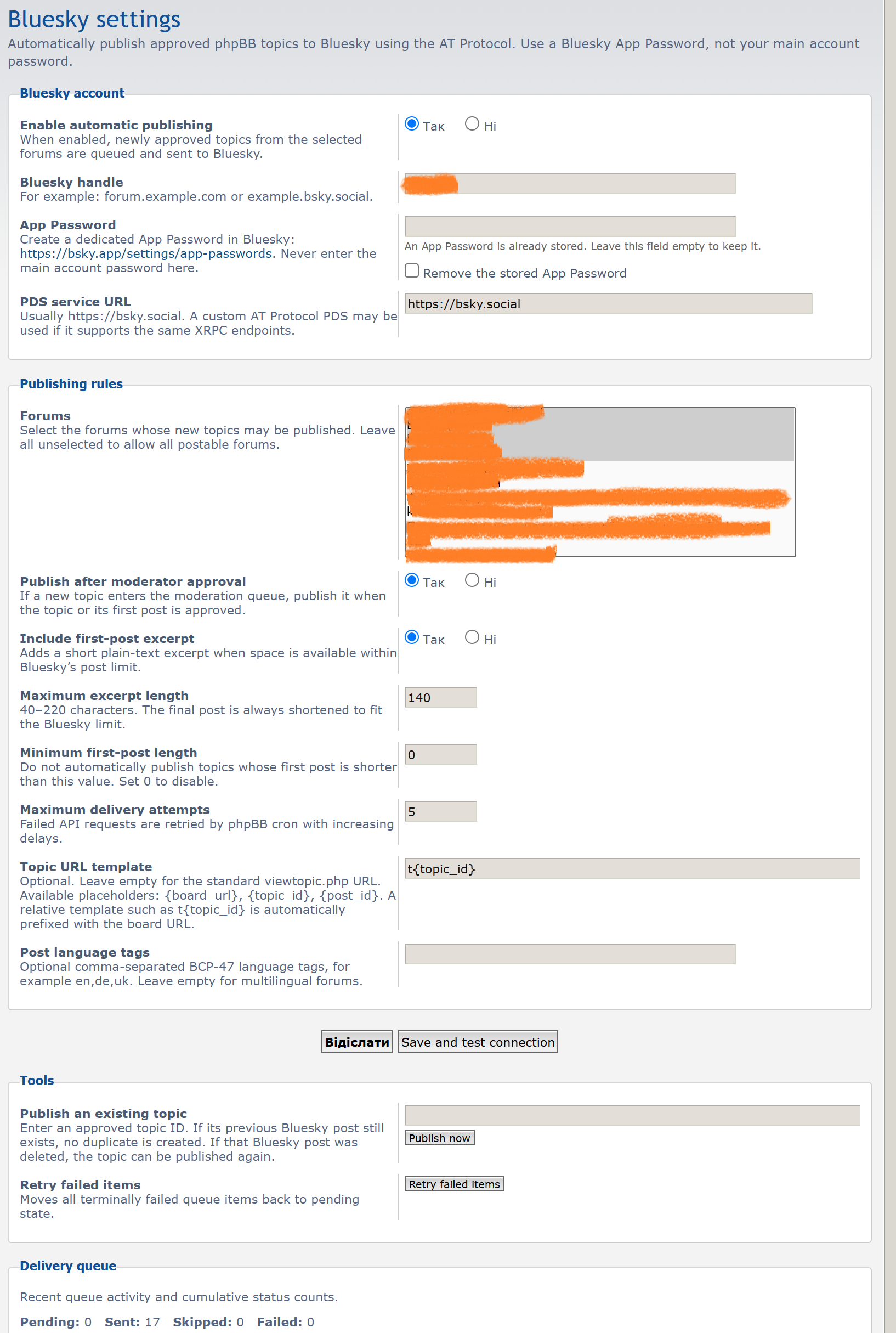
Bluesky for phpBB works as a standard phpBB extension and does not require modifications to phpBB core files or templates.
Features
- Automatic publication of newly approved phpBB topics to Bluesky.
- Optional publication after moderator approval.
- Selection of forums eligible for automatic publishing.
- Automatic inclusion of the topic title and URL.
- Optional plain-text excerpt from the first post.
- Configurable excerpt length and minimum first-post length.
- Clickable topic links using Bluesky rich-text facets.
- External website cards containing the topic title and description.
- Support for standard phpBB URLs and custom clean or SEO-friendly URLs.
- Optional BCP-47 language tags for published posts.
- Delivery queue with protection against duplicate publications.
- Immediate publication attempts and automatic retries through phpBB cron.
- Configurable maximum number of delivery attempts.
- Manual publication of existing approved topics from the Administration Control Panel.
- Safe re-publication when a previously published Bluesky post has been deleted.
- Delivery statistics, recent queue activity and error information in the ACP.
- Support for the standard Bluesky service and compatible custom AT Protocol PDS servers.
- English, German and Ukrainian Administration Control Panel translations.
How it works
When a new phpBB topic is created and approved, Bluesky for phpBB adds it to a delivery queue. The extension then attempts to publish a corresponding post to the configured Bluesky account.
If the forum uses post moderation, the extension can wait until the new topic has been approved by a moderator. Topics from excluded forums or topics that do not meet the configured minimum text length are not automatically published.
Each Bluesky post contains the forum topic title and a link to the original discussion. An optional excerpt from the first post can also be included.
The published post points visitors back to the phpBB forum, where they can read the complete discussion and participate according to the forum's access permissions.
Bluesky post content
The extension generates posts from existing phpBB topic information. The topic title is used as the main text, followed by an optional excerpt and the topic URL.
BBCode and HTML formatting are removed from the excerpt, producing plain text suitable for Bluesky. The final post is shortened when necessary to fit the platform's 300-character limit.
The topic URL is added as a clickable rich-text link. The extension also creates an app.bsky.embed.external website card containing the topic URL, title and description.
Excerpts can be enabled or disabled independently. The maximum excerpt length is configurable from 40 to 220 characters, although the actual published excerpt may be shorter to accommodate the title and URL.
Forum selection and publishing rules
Administrators can choose which phpBB forums are allowed to publish new topics to Bluesky.
If no forums are selected, automatic publishing is allowed for all postable forums. For privacy, administrators should explicitly select only forums whose topics are intended for public distribution, especially when the board contains private or restricted sections.
The minimum first-post length can also be configured. This helps avoid automatically sharing topics containing only a few words. Setting the minimum length to 0 disables this restriction.
The extension publishes new topics rather than automatically publishing every reply or subsequent topic update.
Topic URLs and Clean URLs
By default, Bluesky for phpBB generates standard phpBB topic links such as:
https://example.com/forum/viewtopic.php?t=123
Administrators using an alternative URL structure can configure a custom topic URL template. Available placeholders are:
{board_url}– the phpBB board URL.{topic_id}– the topic identifier.{post_id}– the first post identifier.
For example, forums using ButtonPusher Clean URLs can configure:
t{topic_id}
This produces a URL such as:
https://example.com/forum/t123
Relative URL templates are automatically resolved against the phpBB board URL. Custom URL support also allows the extension to work with other SEO-friendly URL implementations.
Delivery queue and automatic retries
Bluesky for phpBB maintains a database-backed delivery queue to track publication attempts and results.
When a topic is queued, the extension attempts immediate delivery if the Bluesky account is configured. If the API request fails, the topic remains pending and can be retried automatically by phpBB cron.
Retries use increasing delays to avoid repeatedly sending requests during temporary connection problems or Bluesky service interruptions.
The maximum number of attempts is configurable. Once the limit is reached, the delivery is marked as failed. Administrators can reset failed items for another attempt from the ACP.
The administration interface displays the number of pending, sent, skipped and failed items, along with recent queue entries and available error messages.
Duplicate protection and manual publishing
Each published topic is tracked by its phpBB topic ID. This prevents the same topic from being automatically published multiple times.
Administrators can also publish an existing approved topic manually by entering its topic ID in the Administration Control Panel. Manual publishing can be used independently of the automatic forum-selection and minimum-length rules.
If the topic was previously published, the extension checks whether the corresponding Bluesky record still exists.
When the original Bluesky post is still available, the extension does not create a duplicate. If the Bluesky post has been deleted, the topic can be published again.
Bluesky authentication
The extension uses the official AT Protocol XRPC endpoints for authentication and publication.
Administrators must configure a Bluesky handle and a dedicated Bluesky App Password. The main Bluesky account password should never be entered into the extension.
The default service URL is https://bsky.social. A custom HTTPS Personal Data Server (PDS) can also be configured if it supports the required AT Protocol endpoints.
The App Password is stored in the phpBB configuration database. Administrators should therefore restrict access to the database and Administration Control Panel and use a dedicated App Password that can be revoked independently.
Requirements
- phpBB 3.3.0 or newer in the phpBB 3.x series.
- PHP 7.2 or newer.
- A Bluesky account with an App Password.
- Outgoing HTTPS access to the configured Bluesky or AT Protocol PDS service.
- phpBB cron processing for automatic delivery retries.
Included languages
The extension includes Administration Control Panel language files for English, German and Ukrainian.
Installation
- Download the extension archive.
- Extract it into your phpBB installation so that the extension files are located in:
ext/buttonpusher/bluesky/ - Open the phpBB Administration Control Panel.
- Go to Customise → Manage extensions.
- Find ButtonPusher Bluesky for phpBB and click Enable.
- Open Extensions → Bluesky for phpBB → Bluesky settings.
- Enter your Bluesky handle and App Password.
- Click Save and test connection to verify authentication.
- Enable automatic publishing and configure the required publishing rules.
No modifications to phpBB core files or templates are required. The extension creates its own delivery queue database table during installation.
Administration settings
The Administration Control Panel provides configuration options for the Bluesky account, automatic publishing, eligible forums, moderator approval, excerpt length, minimum first-post length, delivery attempts, topic URL templates and post language tags.
Administrators can test the Bluesky connection, manually publish approved topics, retry failed queue items and review recent delivery activity without editing configuration files.
Version 1.0.0
- Initial public release.
- Added automatic publication of newly approved phpBB topics to Bluesky.
- Added support for publication following moderator approval.
- Added configurable forum selection and minimum first-post length.
- Added optional first-post excerpts and automatic text shortening.
- Added clickable URL facets and external website cards.
- Added custom topic URL templates for clean and SEO-friendly URLs.
- Added optional BCP-47 language tags.
- Added a delivery queue with duplicate protection and automatic retries.
- Added manual publishing and safe re-publication of deleted Bluesky posts.
- Added queue statistics, delivery statuses and retry controls in the ACP.
- Added English, German and Ukrainian language files.
Download
Download Bluesky for phpBB 1.0.0
Current version: 1.0.0
License: GNU General Public License v2.0 only (GPL-2.0-only).
Comments (0)