ButtonPusher LinkSpam Finder 1.0.0 is a free, lightweight moderation extension for phpBB 3.3.x. It helps forum administrators find posts containing excessive numbers of links, making it easier to identify potential link spam, unwanted promotion, and suspicious messages.
Instead of automatically blocking or deleting content, LinkSpam Finder scans existing forum posts and presents the results in the Administration Control Panel (ACP). Administrators can review individual messages and decide whether any action is necessary.
Key Features
- Scan existing posts: Search forum messages for posts containing a specified minimum number of links.
- Configurable threshold: Set the minimum number of links from 0 to 999. The default value is 5.
- Multiple link formats: Detect standard HTTP and HTTPS URLs, BBCode URL links, and image BBCode blocks.
- Duplicate handling: Avoid counting duplicate URLs multiple times within the same message, outside image blocks.
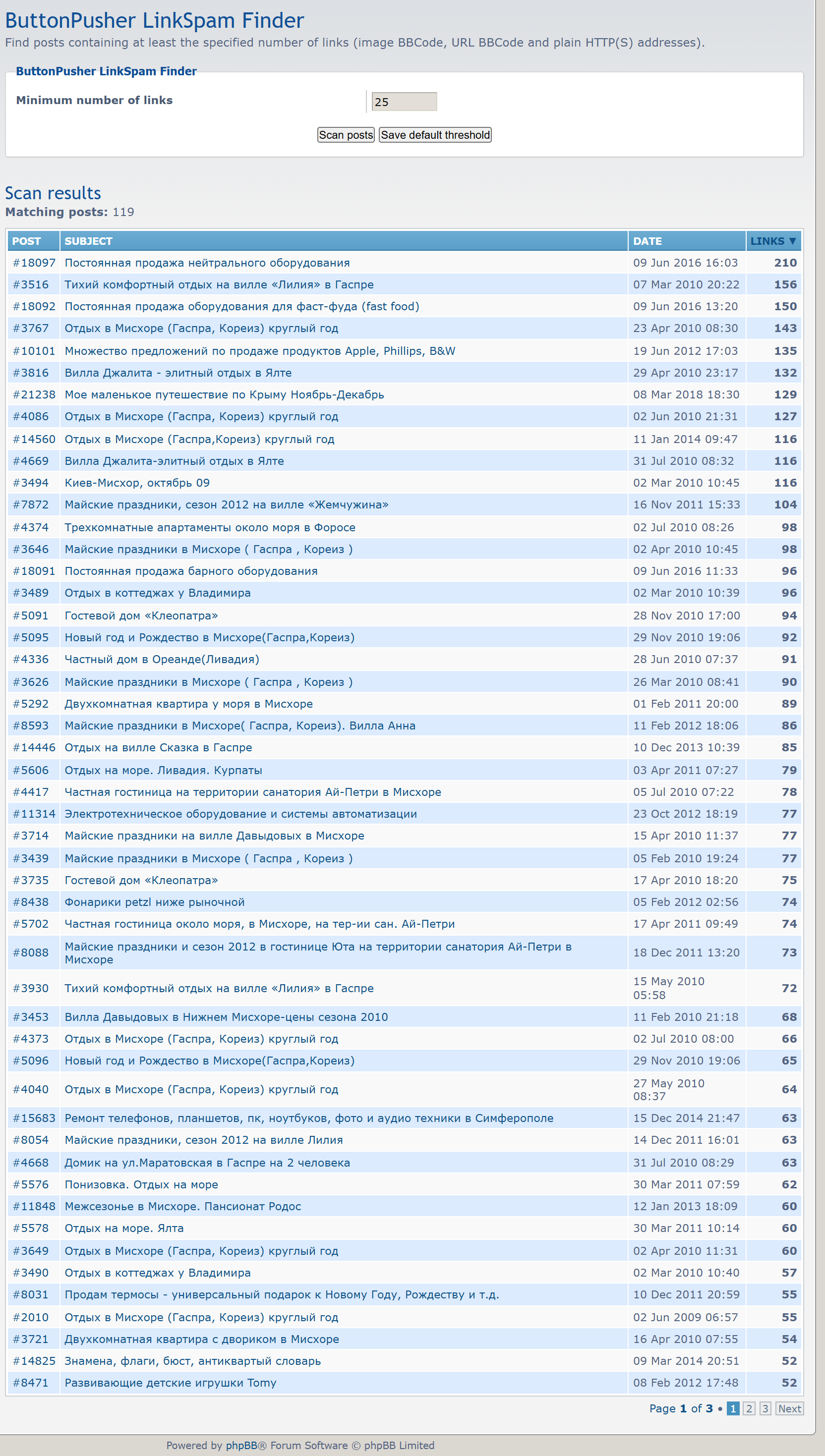
- Sortable results: Click the Links column heading to sort messages by the number of detected links in ascending or descending order.
- Pagination: Browse results with 50 messages per page while preserving the selected sorting order.
- Direct navigation: Open individual messages or click their topic titles to navigate directly to the relevant posts.
- CleanURLs compatibility: Generate SEO-friendly links when ButtonPusher CleanURLs is enabled.
- No session IDs: Public links in search results do not contain unnecessary sid parameters.
- Read-only scanning: The extension never edits, deletes, or automatically moderates forum posts.
Compatibility with ButtonPusher CleanURLs
LinkSpam Finder supports the ButtonPusher CleanURLs extension. When CleanURLs is enabled, search results use its configured URL patterns, including the correct topic page offset and post anchor.
For example, instead of generating a standard phpBB URL such as viewtopic.php?p=456#p456, the extension can generate t123-15#p456.
Both the post number and the topic title can link directly to the matching message. If CleanURLs is disabled, LinkSpam Finder falls back to standard phpBB URLs.
How to Use LinkSpam Finder
- Install and enable the extension through the phpBB Administration Control Panel.
- Open ACP → Extensions → ButtonPusher LinkSpam Finder → Settings.
- Enter the minimum number of links to search for.
- Click Scan posts to run the search.
- Review the results, sort them by link count, and open suspicious messages for further inspection.
The default threshold can also be saved for future scans. Search operations do not modify the original messages.
Requirements
- phpBB 3.3.x
- PHP 7.2 or newer
Supported languages: English, German, Ukrainian, Russian, French, Italian, Spanish, Polish, Czech, Turkish, Hebrew, Portuguese, and Brazilian Portuguese.
Installation
Extract the extension archive to the ext/buttonpusher/linkspamfinder/ directory of your phpBB installation.
Navigate to ACP → Customise → Manage extensions and enable ButtonPusher LinkSpam Finder. After activation, its settings will be available under the Extensions tab.
The extension does not require manual database changes. Version 1.0.0 is the initial public release.
Performance and Limitations
LinkSpam Finder scans existing message content to identify link-heavy posts. On very large forums, scanning may take additional time and memory.
Link detection is heuristic. A high number of links does not necessarily indicate spam, so administrators should review the results before taking moderation action.
License and Author
Version: 1.0.0
Author: ButtonPusher
License: GNU General Public License v2.0 (GPL-2.0-only)
ButtonPusher LinkSpam Finder is free and open-source software.
Download
Download LinkSpam Finder 1.0.0
Current version: 1.0.0
Comments (0)